2026 Digital Small Business Bookkeeping: What to Know Before You Commit
Staying financially organized while also managing daily operations, marketing, and long-term goals is a common challenge for small business owners. The 2026 Digital Small Business Bookkeeping guide positions itself as a single solution that addresses all of these areas in one downloadable package. Before deciding whether this type of all-in-one planner fits your workflow, it helps to examine what it actually includes, how it compares to using separate tools, and which kinds of business owners tend to get the most value from it.
What This Digital Planner Offers
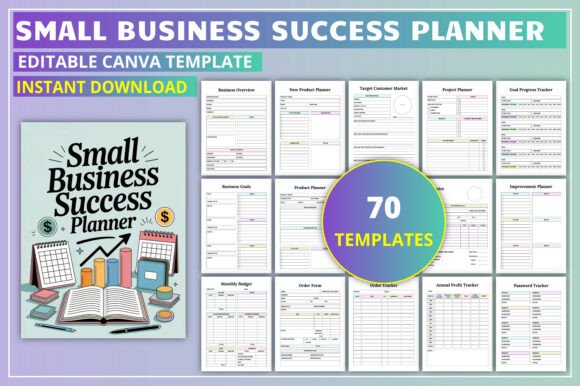
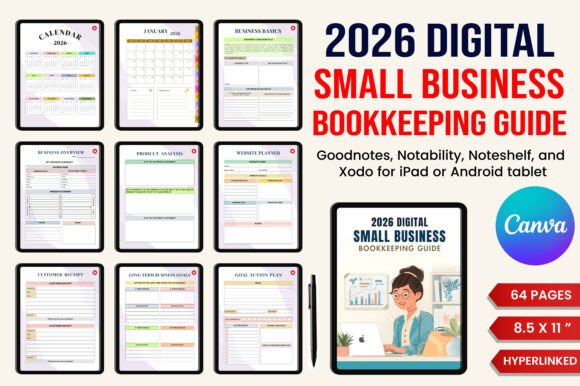
At its core, the 2026 Digital Small Business Bookkeeping guide is a structured digital workbook designed for use on tablets or desktop devices. It combines financial tracking templates with business planning, project management, and marketing coordination pages. The planner includes a full-year 2026 calendar alongside dedicated sections for income tracking, expense logging, tax deduction records, profit and loss statements, sales tracking, and monthly financial reviews.
Beyond bookkeeping, the guide adds pages for business goal brainstorming, branding kits, product analysis, seasonal promotions, campaign management, and social media planning. There are also practical tools like a contact list, order tracker, customer receipt templates, and a weekly to-do list. The idea is that you open one file and have access to everything from a budget tracker to a launch checklist for a new shop or product line.
Because it is delivered as a digital file, you can type directly into the fields, duplicate pages, and reorganize sections without printing anything. This format appeals to entrepreneurs who already work on a tablet or laptop and want to reduce paper clutter.
Why Business Owners Are Looking at This Tool
The main reason business owners explore the 2026 Digital Small Business Bookkeeping guide is the appeal of consolidation. Instead of juggling a separate accounting app, a marketing calendar, a goal-tracking notebook, and a client contact database, this planner promises to hold all of that information in one place. For solopreneurs and freelancers who are not yet ready to invest in multiple paid software subscriptions, a single purchase that covers several functions can feel like a practical choice.
Another factor is the desire for structure. Many entrepreneurs start their year with good intentions about tracking finances and planning campaigns, but without a dedicated system, those habits often fade by February. Having a pre-built template with prompts and categories can make it easier to stay consistent. The planner also includes sections like target customer market analysis and long-term business goals, which support strategic thinking beyond day-to-day bookkeeping.
For those who already use digital planners for personal organization, extending that habit to business management feels natural. The format allows for easy editing, searching, and copying of pages, which is harder to do with a physical notebook.
Benefits of an All-in-One Digital System
One clear advantage of the 2026 Digital Small Business Bookkeeping guide is the time saved on setup. Instead of building your own spreadsheets or researching which separate tools to combine, you get a ready-made framework. The sections for income and expense tracking are already laid out with common categories, so you can start entering data immediately.
Another benefit is the integration between financial and non-financial planning. When your marketing plan, product analysis, and budget tracker live in the same file, it becomes easier to see how a planned promotion affects your monthly sales forecast or how a new product launch aligns with your cash flow. This connected view can help you make more informed decisions about spending and timing.
The digital nature of the planner also means you can reuse it year after year. You may need to update dates and goals, but the core structure remains relevant. For business owners who value consistency in their record-keeping, this continuity is helpful.
Tradeoffs and Limitations to Consider
No single tool works perfectly for every business, and the 2026 Digital Small Business Bookkeeping guide has limitations worth weighing. Because it is a PDF-style digital planner rather than a live software application, it does not offer automatic calculations, bank feed integration, or real-time data syncing. You will need to manually enter all transactions, update balances, and calculate totals. For business owners handling a high volume of daily transactions, this manual process can become time-consuming and increases the risk of data entry errors.
Another tradeoff is the lack of collaboration features. If you work with a bookkeeper, accountant, or virtual assistant, sharing a static digital file is less convenient than granting access to a cloud-based accounting platform. Multiple people editing the same file can lead to version confusion unless you establish clear protocols for updates.
The planner also requires a certain level of digital comfort. While typing into form fields is straightforward, navigating between dozens of pages, duplicating sections, and organizing your own tabs takes some initial learning. Business owners who prefer a more guided experience may find the open structure less helpful than a software tool that prompts them step by step.
Additionally, the guide covers many areas, but it does not replace specialized tools for inventory management, payroll, invoicing, or CRM. If your business relies heavily on any of those functions, you will still need separate solutions, and the planner becomes a supplementary rather than a primary system.
Where This Planner Shines
The 2026 Digital Small Business Bookkeeping guide tends to be a strong fit for solopreneurs, freelancers, and very small teams who have relatively simple financial structures. If you run a service-based business with a handful of clients each month, or if you sell a limited number of products through your own website or at markets, the manual tracking approach is manageable and the planning sections add genuine value.
It is also well suited for business owners who are in the early stages of formalizing their operations. If you have been tracking income and expenses informally and want to introduce more structure without committing to paid accounting software, this planner provides a low-cost middle ground. The goal brainstorming, branding kit, and marketing plan pages can help you clarify your business strategy while you also set up basic bookkeeping habits.
Creative entrepreneurs, consultants, coaches, and online course creators are another group that often finds this planner useful. These business types typically have moderate transaction volumes, periodic product launches, and a need to coordinate marketing efforts with financial tracking. The campaign manager and seasonal promotions sections align well with how these businesses plan their year.
For anyone who already uses a digital planning app like GoodNotes, Notability, or a PDF annotation tool, the format integrates into an existing workflow with minimal friction. You can keep the planner in the same folder as your personal planner, meeting notes, and other reference documents.
When Alternatives Might Serve You Better
If your business processes more than 30 to 50 transactions per month, or if you have employees, contractors, or multiple revenue streams, manual entry in a digital planner may become a bottleneck. In these situations, cloud-based accounting software like FreshBooks, Wave, or QuickBooks provides automated bank feeds, invoicing, and reporting that save significant time and reduce errors.
Similarly, if you need to collaborate with an accountant or bookkeeper on a regular basis, a shared platform with audit trails and reconciliation features is more practical than exchanging a digital file. The 2026 Digital Small Business Bookkeeping
Retail businesses with physical inventory will likely need dedicated inventory management software regardless of which bookkeeping system they choose. The product analysis and order tracker pages in the planner can support small-scale tracking, but they do not replace systems designed for stock levels, reorder points, or supplier management. Entrepreneurs who prefer automated workflows and integrations between their tools may also find the manual nature of this planner limiting. If you already use a CRM, email marketing platform, and payment processor, adding a digital planner that does not sync with any of them means you are duplicating data entry across multiple systems. Choosing whether to use the 2026 Digital Small Business Bookkeeping guide comes down to evaluating your current operational complexity and your preferred way of working. Start by listing the financial and planning tasks you perform in a typical week. If most of those tasks involve recording a manageable number of transactions, outlining marketing efforts, and setting periodic goals, then an all-in-one digital planner is likely sufficient. Consider also how much time you are willing to invest in manual data entry versus setup and learning. This planner requires upfront time to populate pages, customize categories, and build the habit of regular updates. If that investment feels reasonable compared to the cost of multiple subscriptions, it is worth trying. Think about the long term as well. A digital planner can serve you well in the early years of your business, but as you grow, you may eventually need to migrate to more scalable tools. That does not make the planner a poor choice now, as long as you are aware that it is not a permanent solution for a high-growth business. Finally, test your own digital workflow. If you already use a tablet for note-taking and planning and you are comfortable navigating PDFs, the learning curve will be low. If you primarily work on a desktop and rarely use annotation or form-filling software, consider whether the format will feel natural or frustrating. The 2026 Digital Small Business Bookkeeping guide offers a practical, consolidated approach for entrepreneurs who want their finances, plans, and operations in one place without a monthly subscription. For the right business owner, it can simplify the year ahead. For others, it will highlight the need for automation and collaboration features that only dedicated software can provide. Understanding where you fall on that spectrum is the key to making a confident decision.How to Decide If It Aligns with Your Needs
🔗 You Might Also Like