2027-2028 Digital Fitness Planner KDP: What to Check Before You Buy or Upload
Planning your fitness journey across two years requires more than motivation—it requires the right tools. The 2027-2028 Digital Fitness Planner KDP has become a popular choice for anyone who wants a ready-to-upload interior for Amazon KDP, complete with a Canva template, PDF files, and all the extras like PNG and JPG files. But as with any digital product, there are details that can make the difference between a smooth experience and a frustrating one. Whether you are a creator looking to publish on KDP or a consumer wanting a personal planner, knowing what to look for saves time, money, and effort.
Understanding the Product and Its Purpose
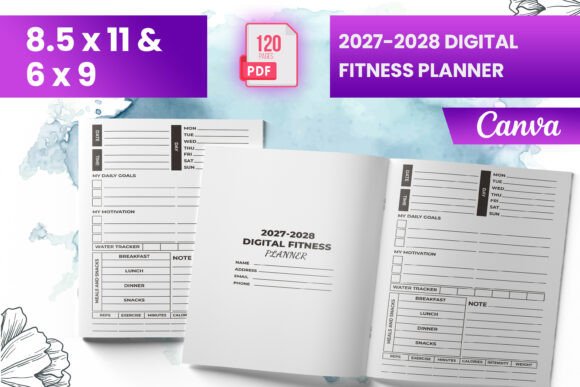
This digital fitness planner covers two years—2027 and 2028—and is designed as a KDP interior. That means it is formatted specifically for Amazon's Kindle Direct Publishing platform. The package typically includes a ready-to-upload PDF file, PNG and JPG versions, and a Canva template for customization. With 120 total pages and dimensions of 8.5 x 11 inches, the interior includes a bleed, which is essential for professional print quality. An intro page sets the tone, and the files are tested to meet KDP guidelines.
People choose this planner for several reasons: they want a consistent fitness tracking system, they need a customizable template for their own brand, or they plan to sell it on Amazon as a low-content book. But the convenience of a pre-made product can also lead to oversights that affect usability, print quality, or even approval by KDP.
Overlooking the Bleed Setting and Trim Requirements
One of the most frequent errors is not understanding what "bleed" means for a print-ready file. The 2027-2028 Digital Fitness Planner KDP comes with bleed included, which is excellent. Bleed ensures that background colors or images extend slightly beyond the final trim size so there are no white edges after cutting. However, some users assume that any PDF will work as long as it looks good on screen. That assumption can lead to rejected uploads or poor print results.
Check that your PDF has a 0.125-inch bleed on all sides if you are printing through KDP. The product listing states it includes bleed, but always verify in your own file viewer. Open the file and look at the margins. If text or important elements are too close to the edge, they might get trimmed off. The safe zone should be at least 0.25 inches inside the bleed line.
Ignoring the 120-Page Structure and Content Flow
With 120 total pages, the planner covers two full years. That is a substantial amount of content, but it is not infinite. Some buyers expect every possible fitness tracker—daily logs, monthly overviews, meal planners, habit trackers, progress photos—all in one book. The 2027-2028 Digital Fitness Planner KDP includes an intro page and likely a structured layout, but you need to review the page types before purchasing or publishing.
Look at the sample pages. Does the planner include weekly spreads or only monthly ones? Are there enough log pages for daily tracking? If you plan to use it personally, think about how often you want to record data. A planner with mostly weekly pages might not suit someone who wants daily entries. If you are publishing it, consider whether the page count and layout meet your target audience's expectations. Adding more content later requires a new file, so get it right upfront.
Assuming All File Formats Are Interchangeable
The product includes PDF, PNG, and JPG files. That is generous, but each format serves a different purpose. The PDF is the primary file for KDP upload. PNG and JPG files are useful for previews, marketing images, or editing in Canva. Some people mistakenly upload a PNG file directly to KDP, which can cause resolution or page count issues. KDP expects a single PDF file that contains all pages in order. The PNG and JPG files are not substitutes for the print-ready PDF.
If you plan to customize the planner using the Canva template, export it as a PDF Print format (not PDF Standard) to preserve bleed, fonts, and image quality. Also, do not compress the PDF excessively. KDP has file size limits, but a compressed file can lose sharpness, especially for text and graphics.
Skipping the KDP Upload Test Despite the Product Being Tested
The listing mentions that files were tested on Amazon KDP to ensure quality. That is reassuring, but it does not mean you should skip your own testing. KDP's systems update, and file behavior can vary based on your account settings, chosen trim size, or paper type. Always run a test upload to see how the preview looks in the KDP Kindle Create or web-based previewer. Check that all pages appear, that the bleed is correct, and that no elements are missing.
Testing also reveals if the PDF is properly formatted for both print-on-demand and Kindle versions. Some digital planners work well as paperbacks but fail as hardcovers because of spine width or margin changes. The 8.5 x 11 inch size is standard, but double-check that the interior margins (gutter) are set wide enough for binding. A gutter too narrow makes the text disappear into the spine.
Underestimating the Canva Template Learning Curve
Having a Canva template is a huge advantage for customization. You can change colors, add your logo, adjust fonts, and insert additional pages. However, Canva has its own quirks. If you are not familiar with Canva's print settings, you might accidentally resize elements, lose bleed, or alter the page order. Some users also forget that Canva free accounts have limited export options. The 2027-2028 Digital Fitness Planner KDP likely requires a Canva Pro account to export with transparent backgrounds or full-resolution PDFs, depending on the assets used.
Before editing, make a backup copy of the original template. Work in a duplicate so you can always revert. Use Canva's "File > Make a copy" feature. If the template uses specific fonts, ensure they are available on your account or replace them with similar ones to avoid layout shifts.
Start with the Intro Page to Set Context
The intro page is not just decoration. Use it to state the purpose of the planner, add your name or brand, and include a short guide on how to use the pages. If you are selling on KDP, this page helps customers understand what they are buying. It also sets a professional tone. Keep the intro concise—one page is enough. Avoid cramming it with too much text or heavy graphics that might not print well on standard paper.
Customize the PNG and JPG Files for Marketing
These image files are perfect for creating product previews, social media posts, or Amazon A+ content. You can show a sample spread, the intro page, or a close-up of the habit tracker. Use consistent branding across your images. If you are a consumer, you can print the PNG files and use them as inserts for a binder or discbound system. They also work as digital stickers for a tablet planner app like GoodNotes or Notability.
Print a Test Page Before Full Production
Even though the product is ready to upload, print one or two pages at home or at a local print shop. Check the ink density, font legibility, and overall appearance. Sometimes what looks good on a screen appears too light or too dark on paper. The 8.5 x 11 inch size is letter size, so standard printers handle it easily. Adjust the contrast or brightness in Canva or your PDF editor if needed.
Plan for Two Years of Use, Not Just One
A two-year planner is a commitment. Some people buy it but stop tracking after a few months because the layout does not match their evolving needs. To avoid this, leave room for flexibility. The 2027-2028 Digital Fitness Planner KDP likely has a fixed structure, but you can use blank pages or add sticky notes for extra notes. If you are publishing, consider including a few blank or bullet journal-style pages at the end for open-ended tracking.
Also, think about how you will carry the planner. A two-year book is thicker than a single-year planner. The 120-page count at 8.5 x 11 inches will be noticeable. If you plan to keep it at home, thickness is less of an issue. If you take it to the gym, consider a lightweight cover or a spiral binding option if available.
What to Check Before Making a Final Decision
Before you buy or upload the 2027-2028 Digital Fitness Planner KDP, verify these key points:
First, confirm the exact dimensions. The listing says 8.5 x 11 inches, which is standard for US letter size. If you are outside the US, check whether your local print service supports this size or if you need to adjust. Second, examine the page count: 120 pages means 60 sheets of paper if printed double-sided. That is a reasonable thickness for a paperback but might be thin for a spiral-bound book. Third, ensure the PDF file name matches KDP's naming conventions—avoid special characters or long spaces.
Fourth, look at the PNG and JPG resolution. For marketing images, 300 DPI is ideal for print, but 72 DPI is fine for web. The product should include high-resolution files. Fifth, consider your audience. If you are selling this planner, who is your ideal buyer? Busy professionals might want a minimalist design, while fitness enthusiasts might prefer detailed tracking. The template's design should align with their expectations.
Finally, understand the license. Some KDP interiors come with a commercial license that allows you to sell the printed book, while others are for personal use only. The product description states it is for KDP interior, which typically means you can publish and sell it. But read the terms carefully. Respect the creator's rights and avoid redistributing the digital files as free downloads.
Better Approaches for Using the Planner Effectively
Instead of jumping straight to uploading or printing, take a few hours to plan how you will use the content. For personal use, set up your fitness goals for 2027 and 2028 on the intro page or a separate note. Break down each year into quarterly milestones. Use the daily logs to track workouts, nutrition, sleep, or mood. Consistency matters more than perfection—use the planner even on days when you miss a workout.
For publishing, add a short user guide or tips page after the intro. This adds value and helps customers get started quickly. You can also bundle the PNG files as bonus downloads for buyers. Include instructions on how to use them digitally or as printables. This small addition increases perceived value without requiring extra page space.
If you find that the planner lacks a specific tracker you need—like water intake or step count—design a simple addition in Canva and insert it into the template. The beauty of a digital template is that you can modify it before uploading. Just keep the overall design consistent so it does not feel like a last-minute patch.
Final Considerations for a Smooth Experience
The 2027-2028 Digital Fitness Planner KDP is a solid choice for anyone who wants a ready-to-use, print-ready fitness planner that spans two years. The included PDF, PNG, JPG, and Canva template provide flexibility for both personal use and commercial publishing. But success depends on how well you prepare.
Double-check the bleed, test your upload, understand each file format's role, and customize thoughtfully. Avoid the common pitfalls of assuming everything works automatically. A little upfront effort ensures your planner prints correctly, looks professional, and serves its purpose for the full two years. Whether you are tracking your own fitness or launching a product on Amazon, attention to these details makes all the difference.