Goal Planner Canva KDP: Building Planners That Readers Actually Use
The appeal of creating a goal planner with Canva for KDP is easy to understand. You see a growing market, you have design tools at your fingertips, and you imagine a finished product that helps people organize their ambitions. But between that initial idea and a polished, useful planner, there are several traps that can turn a promising template into a frustrating experience for buyers. Understanding what actually makes a goal planner effective—and what undermines it—can save you time, money, and disappointed customers.
Why a Goal Planner Is More Than a Collection of Pages
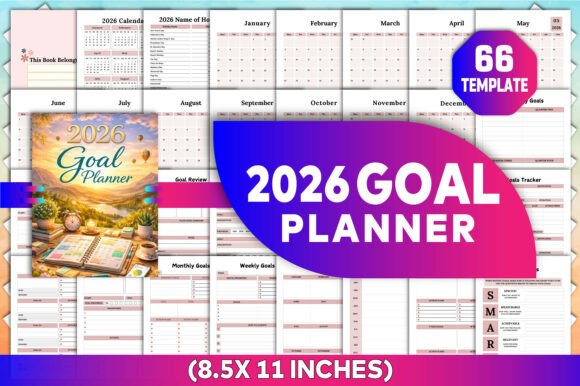
A goal planner is not just a place to write down wishes. The best ones create a system that moves someone from vague intention to concrete action. The 2026 Goal Planner KDP Creations with Customizable Canva Templates promise that structure, but only if the person assembling the planner understands how each section connects. Many sellers treat the interior as a checklist of trendy pages without considering whether those pages work together. A mood tracker placed randomly between financial goals and a bucket list, with no logical thread, confuses the user. Buyers sense this disconnect quickly and either abandon the planner or leave critical reviews about poor flow.
When you look at what’s inside this kind of template, you see pages like Goal Action Plan, Weekly Goals, Yearly Goals, and S.M.A.R.T Goals. These are powerful tools, but their placement matters. The user should feel guided from big-picture thinking down to daily tasks, not bounced between unrelated exercises. If the layout forces someone to flip back and forth without a clear path, the planner becomes a source of friction rather than clarity.
Common Mistake: Treating All Template Pages as Required
One of the most frequent errors I see is the assumption that every page included in a Canva KDP template must appear in the final book. That is simply not true. The list you are given—from 2026 Calendar and Monthly Planner to Life Assessment and Affirmations—is a menu, not a mandate. Experienced creators know that a tighter, more focused planner earns better reviews than a bloated one.
Consider the difference between a planner that includes a Vision Board, a Bucket List, a Meal Plan, and a Mood Tracker, and one that selects only the sections most relevant to a specific audience. The unfocused version tries to serve everyone but serves no one well. Someone looking for career goal planning does not need a meal plan section. A person focused on financial goals may not benefit from a mood tracker. By including everything, you dilute the purpose of the planner and add printing costs that reduce your profit margin.
A better approach is to decide who you are designing for. If you want a general goal planner, choose the pages that support the complete goal-setting cycle: reflection, planning, tracking, and review. Keep the extras only if they genuinely support that cycle. For example, a Life Assessment and Review of Life Areas make sense in a holistic goal planner. A Meal Plan does not, unless you are creating a specialized health and goals hybrid.
Overlooking the Functional Role of Reflection Pages
Reflection pages like Weekly Reflection, Monthly Reflection, Personal Reflection, and Goal Reflection are not filler. They are the most important pages in the entire planner. Without them, the user is just recording tasks, not learning from their progress. Many KDP creators underestimate how much thought these sections require. A poorly designed reflection page—one that just asks “What did you learn?” with a single blank line—offers no guidance. The user does not know what kind of reflection is valuable or how to structure their thinking.
A useful reflection page prompts specific evaluation. For a Monthly Reflection, include questions like: Which goals moved forward this month? What obstacle appeared more than once? What adjustment would make next month more productive? For a Goal Reflection, ask: Is this goal still meaningful? Has my motivation changed? Do I need to revise the timeline? These prompts turn passive pages into active tools.
If you are using a customizable Canva template, take the time to revise the reflection prompts. The default text may be too vague. Write prompts that match the tone and depth your audience expects. This small investment dramatically improves the perceived value of the planner.
The Hidden Problem with S.M.A.R.T Goals Pages
S.M.A.R.T Goals (Specific, Measurable, Achievable, Relevant, Time-bound) appear in nearly every goal planner. But the way they are implemented often undermines their purpose. A S.M.A.R.T goals page that has five blank fields with no example or explanation assumes the user already knows how to write a proper objective. In reality, most people need guidance. They write goals that are either too vague or too rigid, and then they get discouraged when the planner does not help them follow through.
A better S.M.A.R.T goals page includes a short definition of each letter and an example that fits the planner’s theme. If your planner targets professionals, show a work-related example. If it is for personal growth, use a health or relationship example. The example teaches the user how to use the tool correctly. This is especially important for beginners who may be buying their first goal planner.
Also consider how the S.M.A.R.T goals page connects to the Goals Plan and Goal Action Plan pages. If the user writes a S.M.A.R.T goal on one page and then has to flip to a different page to create action steps, the process becomes disjointed. A sequential layout where the S.M.A.R.T goal is immediately followed by the action plan creates a natural workflow. Check your template’s order. If pages are scattered, rearrange them in Canva before exporting.
Ignoring Print-Ready Formatting Details
Customizable Canva templates are incredibly convenient, but they do not automatically guarantee a professional print result. Many new KDP creators lose money and time to formatting errors that are entirely preventable. The most common issues include missing bleed, incorrect margins, low-resolution images, and pages that do not trim correctly.
Before you publish, verify that your template includes proper bleed (usually 0.125 inches on each side) and that no important content sits in the trim area. Check that text is at least 0.25 inches from the edge. If the template includes images or graphics, ensure they extend to the bleed line. Canva makes this easy to set up, but only if you know to check it.
Another overlooked detail is the spine width for paperback editions. If your planner has more than about 100 pages, you need to account for the spine in your cover design. A goal planner with 200+ pages will have a visible spine, and ignoring this produces a cover that looks misaligned or unprofessional on Amazon’s preview.
Test your planner by printing a single copy for yourself. Walk through it as a user would. Write in it for a week. You will quickly discover pages that feel cramped, margins that are too tight, or layouts that do not function as intended. No amount of on-screen checking replaces a physical proof.
Underestimating the Role of the Goal Mission Statement
The Goal Mission Statement page is one of the most powerful tools in the planner, yet it is often treated as an afterthought. A mission statement is not a goal. It is a declaration of purpose that guides every goal the user sets. When this page is poorly designed or placed too late in the book, the user misses the opportunity to build a foundation for their planning.
A strong mission statement page should come near the beginning of the planner, ideally after the calendar and holiday pages but before the goal planning sections. It should ask questions like: What matters most to me right now? What kind of person do I want to become? What change do I want to create in my life? These questions help the user clarify their direction before they start setting specific objectives.
Without this grounding, goals become arbitrary. The user sets a goal because it sounds productive, not because it aligns with their deeper priorities. The planner then becomes a collection of tasks with no emotional anchor, and engagement drops quickly. A thoughtful mission statement page prevents this.
The Trap of Overcomplicating Habit and Mood Tracking
Habit Tracker and Mood Tracker pages are popular inclusions, but they are easy to misuse. A habit tracker with too many slots encourages the user to overcommit. They try to track ten habits at once, fail within the first week, and feel defeated. A mood tracker with overly granular options (e.g., twenty different emotional states) overwhelms the user and leads to inconsistent logging.
A better design simplifies both. Limit the habit tracker to three to five key habits per month. Include space for the user to define what constitutes success for each habit. For mood tracking, use six to eight broad categories and a simple scale (e.g., very low to very high). The goal is consistency, not complexity. Pages that are easy to fill out daily get used. Pages that require effort get abandoned.
If your template includes these trackers, review the number of rows and columns. Adjust them to match realistic human behavior. You will create a more satisfying experience for the buyer, which translates to better reviews and higher sales over time.
Choosing the Right Audience and Matching Content
Not every goal planner should contain the same sections. The Needs of a college student planning career goals are different from those of a parent managing family finances or a professional pursuing a promotion. Before you customize your Canva KDP template, decide exactly who you are designing for. Then remove pages that do not serve that person.
For a professional audience, emphasize Quarterly Goals, Yearly Goals, Goal Progress Overview, and Review of Life Areas with a career focus. Include Financial Goals and Achieving Goals sections. Skip the Meal Plan and Vision Board unless they directly support career objectives. For a personal growth audience, keep Self-Care Goals, Life Goals, Personal Reflection, and Affirmations. The Vision Board and Bucket List add emotional value here. The Financial Goals section may be less relevant.
By narrowing the scope, you create a planner that feels made for the buyer. That sense of personalization is hard to achieve with a generic template, but it is exactly what earns five-star reviews and word-of-mouth recommendations.
Testing the Complete User Experience
The last step before publishing is to test the planner from front to back as a real user would. Open the 2026 Calendar, flip to the Monthly Planner, then to the Weekly Goals, then to the Daily Planner. Does the sequence make sense? Are there gaps where the user would need guidance but finds none? Is the Goal Progress page positioned close enough to the Goals Tracker to allow easy comparison?
Also check the spacing between sections. If a Monthly Reflection appears right after a Monthly Goals page, that is natural. If it appears after a Habit Tracker and a Mood Tracker, the user loses the connection between their monthly plan and their reflection. Small rearrangements in Canva make a big difference in the final experience.
Remember that the success of your KDP goal planner depends on how well it serves the person who buys it. A beautiful design with a thoughtful structure will outperform a flashy design with confusing logic every time. Focus on flow, relevance, and usability. The customization options in Canva give you the flexibility to get these details right. Take the time to use them wisely.