2026 ADHD Productivity Journal Canva KDP: A Fully Customizable Planner for Focused Workflows
For anyone managing ADHD, the gap between intention and execution often comes down to structure—not effort. The 2026 ADHD Productivity Journal Canvas KDP template offers a practical bridge: a fully editable Canva template plus printable PDF that combines cognitive-friendly design with flexible customization. Whether you are mapping out a quarter, wrestling with a complex project, or simply trying to get through a Tuesday without losing three hours to distraction, this journal fits into real workflows without demanding that you conform to a rigid system. Instead, it adapts to how your mind actually works.
What This Journal Is—and Where It Belongs in Your Process
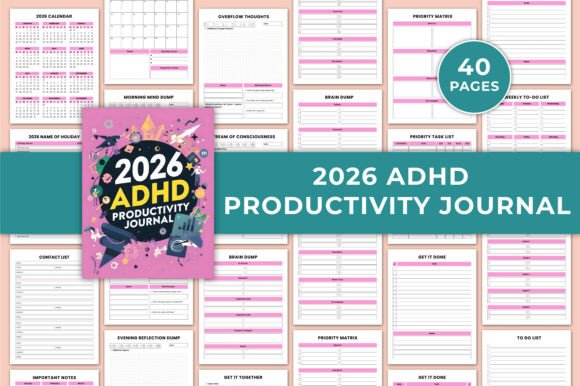
The 2026 ADHD Productivity Journal Canva KDP is not just a dated planner. It is a modular toolkit: 40 pages of printable templates you can edit in Canva before printing, or use digitally. The core offering includes a 2026 calendar, monthly planners, goal pages, and a suite of mental-dump and priority tools. It sits naturally at the intersection of planning and doing—before you start a task to clarify intent, during a project to reset focus, and after completion to reflect and adjust. This three-phase use makes it useful for professionals, freelancers, marketers, bloggers, and anyone who juggles multiple responsibilities without a single consistent routine.
Because it’s a Canva template, you can modify fonts, colors, and layout before printing. That means you can align the journal with your existing brand, color-code by project type, or even remove pages that don’t serve you. The adjustable nature reduces the friction that often kills planner adoption for ADHD brains: if a section feels off, you edit it, not abandon the whole system.
Before a Task or Project: Setting Up for Success
The journal provides several entry points for pre-work preparation. The 2026 Calendar Overview and Monthly Planner pages let you block out major deadlines, holidays, and known high-focus windows. Instead of jumping into a project cold, you first scan the month ahead. The Monthly Goals Section helps you break a big initiative into smaller, time-bound targets. For example, a blogger planning a content series for Q1 2026 can map out themes, publication dates, and milestones on one page, then drill into weekly to-do lists later.
Before a single writing session, the Morning Mind Dump and Stream of Consciousness Pages act as cognitive warm-ups. Offloading racing thoughts—worries, random ideas, reminders—onto paper clears mental RAM. This practice reduces the impulse to multitask and lets you approach the day’s priority task list with a cleaner head. For someone with ADHD, this pre-task ritual is often the difference between starting and stalling.
The Important Dates Pages and Contact List Pages serve a similar preparatory role for time-sensitive or people-dependent tasks. If you need to schedule a call with a client or follow up on a pitch, having these details in a single, customized location saves retrieval time. You can even link the contact list to your CRM or email by adding notes in Canva before printing.
During Execution: Staying On Track in Real Time
Once a task or project is underway, the journal supports ongoing focus through interruptions and energy dips. The Midday Mind Sweep page is designed for a quick reset around lunch: write down whatever is floating in your head—half-finished emails, grocery reminders, creative sparks—and then return to the priority task. This mirrors the Pomodoro technique’s break-for-distraction principle but with a structured capture point.
The Priority Matrix Layout is a straightforward four-quadrant grid (urgent vs. important, for example). During a busy workday, you can use it to re-sort tasks when everything feels equally urgent. Combined with the Priority Task List and Get It Done Task Pages, you have a triage system that adapts as priorities shift. For a project manager juggling multiple deadlines, this reduces the cognitive load of deciding what to do next—you simply consult the matrix and pick the top item in the appropriate quadrant.
The Overflow Thoughts Pages and Brain Dump Pages are half-structured: they give you space to vent or capture tangential ideas without losing the main thread. In a creative workflow—say, designing a marketing campaign—these pages let you record “distraction ideas” that might become useful later, while the Daily To-Do List keeps you anchored to today’s deliverables. The key is separation: the journal acknowledges that your mind will wander, but it gives wandering a designated home.
After Completion: Reflection and Pattern Recognition
The most overlooked phase of any workflow is review. The 2026 ADHD Productivity Journal Canva KDP includes Evening Reflection Dump pages that prompt you to capture what worked, what didn’t, and how you felt. This is not about lengthy journaling; a few bullet points suffice. Over weeks, these reflections reveal patterns—for instance, that you consistently under-estimate task time on Monday mornings or that your focus peaks after a short walk. Recognizing these patterns lets you adjust your planning for future projects.
The Important Notes Pages and Notes section at the end serve as a repository for lessons learned, quotes, or process tweaks. After finishing a content series or completing a client deliverable, you can annotate which templates or workarounds helped. This builds a personalized playbook over time, making the next project easier to initiate because you already know which journal pages to rely on.
For small business owners or freelancers, reviewing completed tasks against the monthly planner and goal section also surfaces gaps in scheduling. You might discover you planned too many client calls in one week or that you need to block creative work earlier in the day. The journal becomes a feedback loop, not just a schedule.
Practical Implementation Tips for Different Users
Preparation: Before you print, open the Canva template and delete any pages that don’t serve your role. A freelancer might remove the Contact List if they use a digital CRM; an educator might add extra Monthly Goal sheets. Adjust colors to separate work and personal priorities—orange for deadlines, blue for long-term goals. Print only what you need for the first month, test the flow, then iterate for the rest of 2026.
Usability: Keep a physical copy at your desk and a digital version on a tablet. During a video call, you can jot notes on the digital Brain Dump page without rustling paper. For hybrid use, export high-quality JPG or PNG files and insert them into a note-taking app like Notion or OneNote. The Get It Together Task Pages translate well to a digital checklist if you prefer typing over handwriting.
Consistency: Set a recurring daily alarm for the Midday Mind Sweep and Evening Reflection. Even if you only use two pages per day, consistency reinforces the habit. The journal’s structure supports a low-stakes commitment: you don’t have to fill every page, and the editable nature means you can redesign a section if it stops working mid-year.
Quality Control: Because the template comes as a 40-page printable PDF with high-resolution JPG/PNG files, ensure your printer handles 8.5x11 inch paper with no bleed. Use a binder or disc-bound system so you can add or remove pages as needed. This modularity is especially valuable for ADHD users who might want to experiment with different layouts without abandoning the whole journal.
Integration with Other Tools, Methods, and Assets
The 2026 ADHD Productivity Journal pairs naturally with digital task managers like Todoist, Trello, or Asana. Use the Weekly To-Do List to capture high-level tasks from your digital board, then drill into daily details. The Priority Matrix can inform how you tag items in your app (due dates vs. energy levels). For time blocking, combine the journal’s monthly overview with your calendar app—import holiday dates from the template into Google Calendar, then print the remaining pages for offline reference.
It also works with planning methods such as the Eisenhower Matrix, Bullet Journaling, or GTD. The Brain Dump Pages replace a GTD inbox, while the Monthly Planner supports a weekly review ritual. The template’s flexibility means you can layer your preferred system on top of its structure without conflict. If you use the Pomodoro technique, use the Get It Done Task Pages to break work into 25-minute blocks, checking boxes as you complete intervals.
For teams or collaborators, customize a shared Canva template with project-wide color codes and deadlines, then print individual copies for each member. The Important Notes Pages can capture meeting minutes or decision logs. Because the template is fully editable, you can even add your logo or brand fonts for a cohesive company planner that still retains ADHD-friendly features like mind dumps and priority matrices.
Long-Term Use: Adapting Across 2026 and Beyond
One of the biggest risks with any planner is abandonment after a few weeks. The 2026 ADHD Productivity Journal Canva KDP mitigates this through customization. If you find the Morning Mind Dump too open-ended, you can edit the Canva template to add prompts like “Top 3 worries” or “One thing I look forward to.” If the Evening Reflection feels repetitive, swap it for a simple rating scale. The ability to change the tool mid-year keeps it aligned with your evolving workflow rather than forcing you to adapt to a static design.
Because the template is reusable for any year (just edit dates in Canva), you can iterate your personal system over multiple cycles. Save the base template as a master, and each December, duplicate it, update the calendar and holidays, and refine the page layout based on what you learned. Over time, the journal becomes a cumulative artifact of your productivity experiments—a practical archive of what actually helps you execute.
The high-quality JPG and PNG files also ensure that if you switch devices or printing services, the pages remain crisp and legible. No bleed means you can print at home or at a print shop without content getting cut off. For long-term organization, store printed pages in a binder with tabs for each month, and archive completed months to keep the journal lean.
Ultimately, the 2026 ADHD Productivity Journal Canva KDP is not a magic solution—it’s a flexible container for the messy, non-linear reality of getting things done with ADHD. By letting you edit before printing, offering capture points at every mental state, and supporting both analog and digital workflows, it fits into routines without demanding perfection. Whether you are a creator brainstorming your next project, a marketer tracking campaign milestones, or a freelancer managing a dozen clients, this journal can absorb your chaos and return structure—exactly when and how you need it.