A Practical Look at the 2027 Finance Planner for Real Life Budgeting
Money management often feels like a puzzle where the pieces keep changing. A raise here, an unexpected expense there, and suddenly last month’s system no longer fits. That’s why planners built for flexibility and real-world use matter. The 2027 Finance Planner is one of those rare tools that adapts to how people actually handle their finances—whether they prefer paper, digital, or a mix of both.
When You Need More Than a Simple Budget
Many budgeting apps track every transaction but leave out the emotional side of financial planning. A young couple saving for their first home, for example, might need to see progress visually and celebrate milestones. The 2027 Finance Planner includes a 50-week savings tracker that turns abstract numbers into a tangible journey. Each checkmark becomes a small victory. It’s not just about the final amount—it’s about staying motivated when the goal feels distant.
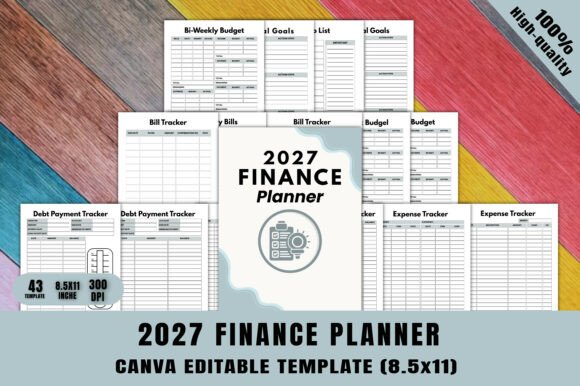
Similarly, someone recovering from credit card debt can use the two-page debt payment tracker to map out a payoff strategy. Seeing the balance drop each month can be more encouraging than a spreadsheet row that never gets looked at. The planner doesn’t just record debt; it makes the process feel manageable.
For Freelancers and Irregular Income
Freelancers often struggle with fixed budgeting systems that assume a steady paycheck. With income that fluctuates month to month, a flexible approach is essential. The 2027 Finance Planner offers a paycheck budget page that works with variable earnings. You can allocate funds based on what actually comes in, not a guess from January.
One freelancer I know uses the bi-weekly budget spread to plan around project payments. She prints a few extra copies and keeps them in a binder, customizing the colors in Canva to match her brand. The planner becomes a portfolio piece as much as a financial tool. For creative professionals, that added personalization makes budgeting feel less like a chore and more like part of their business identity.
Small Business Finances in One Place
Small business owners often wear too many hats. Tracking business expenses, planning for taxes, and separating personal and professional money can get messy. The 2027 Finance Planner includes an annual finance spread over two pages, plus an expense tracker. These pages can be duplicated and dedicated to business use, while the main planner stays for personal finances.
Consider a local bakery owner who needs to budget for seasonal ingredients and holiday staffing. The holiday budget page and upcoming expenses section help him foresee cash flow gaps months ahead. He can customize the planner on Canva to add extra rows for supplier names or notes about seasonal trends. That level of adaptation is hard to find in off-the-shelf planners.
The Power of Customization Without Starting From Scratch
What makes the 2027 Finance Planner stand out is the fully editable Canva source file. You don’t have to be a designer to make meaningful changes. Swap fonts to match your taste, adjust colors to reduce visual clutter, or even rename pages to fit your system. For a KDP publisher, this means you can rebrand the interior for multiple niches—minimalist, floral, professional—without recreating the layout each time.
For the end user, customization means you can remove pages you don’t need. Maybe the online shopping tracker isn’t relevant, but the saving jar and notes pages are essential. Just delete the extra pages in Canva before printing. That flexibility reduces the feeling of being overwhelmed by too many trackers. You build a planner that fits your life, not the other way around.
What to Keep in Mind Before Committing
Every tool has trade-offs. The 2027 Finance Planner offers 43 pages, which is comprehensive but also requires some upfront effort to tailor. If you’re not comfortable using Canva, the learning curve might feel steep at first. However, the template includes a “Thank You” page and clear layout, so even basic edits (like changing a heading) are straightforward once you open the link.
Another consideration: this planner is designed for one year. People who want a long-term savings approach might need to combine it with a separate multi-year goal tracker. The 2027 focus means you’ll need a new planner for 2028, though some users simply duplicate the file and update the dates in Canva. That’s a quick fix if you plan ahead.
Also, if you rely heavily on automatic syncing with bank accounts, a printable planner won’t replace that. But many people find that writing transactions by hand helps them stay more aware of spending. The physical act of writing reinforces the numbers in a way that digital shortcuts don’t.
Making the Planner Work for Your Specific Goals
Let’s talk about different audiences and how they might approach this planner. A college student with a part-time job could use the income tracker and simple monthly budget to build saving habits early. The to-do list and notes pages double as a general life organizer—keeping track of bill due dates alongside assignment deadlines.
A digital nomad might use the planner in a paperless way. The JPG files can be imported into note-taking apps like GoodNotes or Notability. Then the customization happens in Canva before digital use. That way, you have a searchable finance journal that travels wherever you go. The account details page becomes a password-free vault for bank details, stored securely in your device.
Families can share a single printed version by placing it in a central spot. The monthly bills page lets everyone see recurring expenses, and the two-page expense tracker becomes a log for shared costs like groceries and utilities. Parents can involve older kids in filling out the savings jar, teaching financial literacy in a hands-on way.
The 2027 Finance Planner includes a financial calendar, which is often overlooked but highly practical. Marking payment due dates and income arrival days helps avoid late fees and ensures you know exactly when to move money between accounts. For anyone juggling multiple subscriptions or irregular bills, having that calendar visible reduces mental load.
Strengths That Stand Out
- True adaptability: The 100% customizable Canva file means you’re never stuck with a layout that doesn’t work. Change, add, or remove pages without any design skills beyond drag and drop.
- Comprehensive tracking without clutter: The 43 pages cover everything from monthly budgeting to debt payoff and shopping lists. Yet the print-ready PDF keeps the design clean, so it doesn’t feel overwhelming.
- Multiple formats: Having both a PDF and separate JPGs makes it easy to choose between printing at home, sending to a pro printer, or using on a tablet. No file conversion headaches.
- Time savings for creators: If you’re publishing on KDP, this interior saves hours of layout work. You can focus on cover design and marketing while the planner itself is polished and ready.
Where to Exercise Caution
- Not a cookbook approach: The planner doesn’t come with instructions or a guided course. You need to bring your own understanding of budgeting basics. However, most pages are intuitive to fill in.
- One-year lifespan: For those who prefer a perpetual planner, you’ll need to duplicate and update dates each year. That’s a minor extra step but worth noting.
- Digital native limitations: If you want an integrated app experience with auto-categorization, a printable planner won’t deliver that. But it provides a different kind of value: intentionality and mindfulness about money.
Ultimately, the 2027 Finance Planner is a practical tool for anyone ready to take a hands-on approach to their money. Whether you’re a freelancer needing flexibility, a family aiming for transparency, or a creator building a product, this planner gives you a structure that bends to your needs. The real value lies not in the number of pages but in how you make each page your own.